
Tired of your Facebook posts blending in with everyone else’s? It’s time to add something to your profile that really grabs attention.
You’ve probably put a lot of effort into writing that post or updating your bio, only for it to disappear in the sea of plain text on your feed. The good news is that the right Facebook fonts can make your words look fresh, interesting, and memorable in just a few seconds. You don’t need to be a tech expert or download any complicated apps to do it.
Whether you’re styling your profile name, bio, or a new post, stylish text is the secret weapon many social media pros rely on. And the best part? It’s incredibly easy to use.
In this guide, we’ll walk you through everything you need to know about Facebook font generators in simple terms: how they work, how to use them, and how to make your profile eye-catching—no technical skills required.
What Are Facebook Fonts?
Facebook fonts are stylish text designs that use different letters, symbols, and special characters to make your words fancy. Unlike regular typing, these fonts are created using Unicode characters.
To put it simply: When you type something on Facebook, the platform uses its standard font. But with a Facebook font generator, your plain text gets converted into these special Unicode characters that look much more eye-catching and unique.
For example, the simple word “Hello” can appear as:
- 𝓗𝓮𝓵𝓵𝓸
- ℍ𝕖𝕝𝕝𝕠
- 🄷🄴🄻🄻🄾
- 𝐇𝐞𝐥𝐥𝐨
- 𝕳𝖊𝖑𝖑𝖔
These are still the same letters underneath, just styled differently. The great part is that Facebook fully supports them. They don’t mess with any of the platform’s settings; Facebook recognises and displays them as cool, stylish text.
How this Font Generator Works
Using a Facebook text generator is surprisingly simple. Here’s exactly how it works in three easy steps:
Step 1: Type Your Text
Head over to the font generator tool and type or paste the text you want to style. It could be your name, bio, a post, or even a comment.
Step 2: Choose Your Style
You’ll instantly see your text transformed into dozens of different styles. Just scroll through options like bold, cursive, gothic, small caps, and many more until you find one you like.
Step 3: Copy and Paste
Click to copy your favourite style, then paste it straight into Facebook. That’s it, you’re done.
Note: There’s a decoration button next to each font style. Just click it to open a new window, where you can generate fonts in different moods like Attitude, Cute, Excited, Happy, Angry, Gun, and many more.
The tool works in real time, so you can preview how your text looks in different styles before choosing. No downloads, no sign-ups, and no complicated setup required.
Since it’s designed specifically for copy-and-paste FB fonts, you can use your stylish text right away on your profile, posts, comments, or anywhere else on the platform.
Why People Use Fancy FB Fonts
So, why are so many people using stylish fonts for their Facebook bios and posts? Here are some of the most popular and practical reasons:
Unique from the Crowd
Facebook feeds are busy and crowded. With everyone posting, sharing, and commenting, eye-catching text is one of the quickest and easiest ways to grab attention.
Express Your Personality
Your social media profile is a reflection of who you are. The fonts you choose can say a lot about your style and creativity. Whether you want to come across as fun, elegant, bold, or artistic, there’s a font that fits perfectly.
Make Your Posts More Memorable
People remember visual content better. Adding stylish text to your posts makes them more engaging and helps them stick in your friends’ minds.
Build Your Personal Brand
If you’re creating a personal brand or managing a business page, using consistent stylish fonts can make your content instantly recognizable. It becomes like your own unique signature.
Show You Care
Taking just a few seconds to style your text shows that you’ve put real thought into your content. It gives your audience the impression that you care about what you share.
These small touches can make a big difference in how your profile and posts are perceived.
Best Places to Use Fancy Facebook Fonts
Ready to start using stylish fonts? Here are the most effective spots on Facebook where they can make a real impact:
Profile Name
Your name is the first thing people see. While Facebook requires real names to stay in standard characters, you can still add special symbols or decorative elements around it. For example, try something like ꧁ John Doe ꧂ or similar accents to give it a unique touch.
Bio
This is one of the best places to use Facebook bio fonts. Your bio is where you introduce yourself, share your interests, or add a catchy tagline. Stylish text here helps your profile eye-catching and gives visitors a quick sense of your personality.
Posts
Adding stylish fonts to your posts is a great way to highlight important points. Use them for headlines, special announcements, quotes, or key messages. Mixing fancy text with regular text creates nice visual contrast and draws more attention.
Comments
Want your comment to catch the eye in a busy thread? A touch of fancy text can make it pop. It works especially well for fun, celebratory, or important comments — just avoid overdoing it in serious discussions.
Messenger
Make your chats more fun by using stylish fonts in Facebook Messenger. It adds a personal, playful touch when talking to friends or emphasizing something special.
Facebook Groups
In groups, stylish text helps you shine as an active and creative member. It’s perfect for highlighting announcements, event details, or important information.
Facebook Pages
If you manage a page for a business, brand, or community, consistent use of stylish fonts in your page description and posts can help create a recognizable identity. Just keep it professional and balanced so it matches your brand’s image.
These small changes can give your Facebook presence a fresh, polished feel without much effort.
FB Font Types
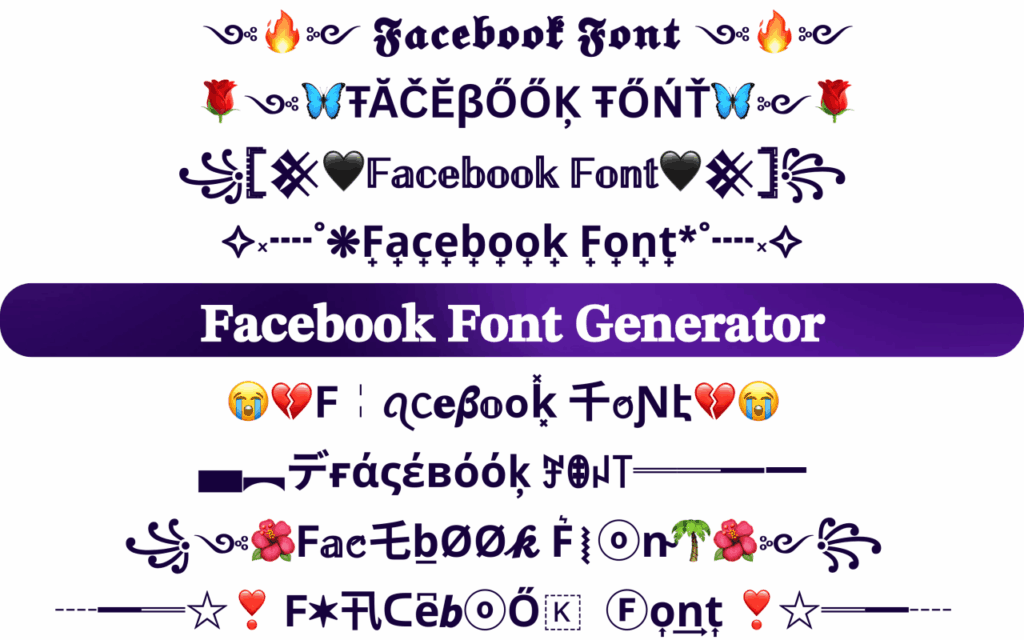
One of the best things about our font generator is the wide variety of styles it offers. Here are some of the most popular Facebook text styles:
Bold Font (𝗕𝗼𝗹𝗱)
Perfect for headlines, important announcements, or adding emphasis. Bold text instantly grabs attention and makes your message unique.
Cursive/Italic Font (𝓒𝓾𝓻𝓼𝓲𝓿𝓮)
Elegant and expressive. This style works beautifully for bios, quotes, romantic posts, or anything creative.
Gothic Font (𝕲𝖔𝖙𝖍𝖎𝖈)
Edgy and dramatic, with an Old English or medieval vibe. Great for making a strong, stylish impression.
Small Caps (ꜱᴍᴀʟʟ ᴄᴀᴘꜱ)
Subtle yet sophisticated. It adds a classy, polished touch without being overpowering.
Double-Stroke Font (𝔻𝕠𝕦𝕓𝕝𝕖 𝕊𝕥𝕣𝕦𝕔𝕜)
Modern and eye-catching. This style makes your text look bold and distinctive.
Monospace Font (𝙼𝚘𝚗𝚘𝚜𝚙𝚊𝚌𝚎)
Clean and consistent, with each letter taking up equal space. It gives your text a neat, organized appearance.
Script Font (𝒮𝒸𝓇𝒾𝓅𝓉)
Sleek and fluid, resembling beautiful handwriting. Ideal for personal or artistic posts.
Squared Font (🅂🅀🅄🅁🄴🄳)
Boxy and bold, with each letter enclosed in a square. This creates a unique, block-style look that really remarkable.
Emojis and Symbols (┈━═☆❣️ ꜰᴀᴄᴇʙᴏᴏᴋ ꜰᴏɴᴛ ❣️☆═━┈)
Many of these Unicode fonts also let you combine stylish text with decorative symbols and emojis. You can easily create frames, borders, or extra visual flair around your words.
With so many options, you can easily find the perfect style to match your mood, message, or personality.
Are Facebook Fonts Safe?
Yes, using a Facebook font generator is completely safe. Here’s why:
- No account access required — You never need to log in or share your Facebook password or any personal details.
- Text-only conversion — The tool simply changes the look of your text. It doesn’t interact with Facebook in any other way.
- No downloads needed — Everything works directly in your browser.
- Fully compatible with Facebook — You’re only pasting Unicode characters that Facebook already supports.
- No risk of getting banned — Using stylish fonts doesn’t violate Facebook’s terms of service, as they’re made from supported characters.
One small thing to keep in mind: some people might find very fancy text a bit hard to read. That’s just a matter of personal preference, not a safety concern.
You can use these fonts with confidence and peace of mind.
💡 A Short Story: The Tale of a Post
Rimi shared a beautiful line of poetry on Facebook: “If only the heart knew the language of love…”
An hour later, she checked and saw just three likes. One comment said, “It’s good, but…”
Rimi felt discouraged. She started wondering if her writing was just not good enough.
Then her younger sister Tania walked in and said, “Rimi, your words are lovely, but they look so plain on the screen. Why don’t you try those fancy fonts everyone uses?”
Tania showed her this font generator tool. Rimi pasted her text, and in just five seconds, it turned into this:
“𝓘𝓯 𝓸𝓷𝓵𝔂 𝓽𝓱𝓮 𝓱𝓮𝓪𝓻𝓽 𝓴𝓷𝓮𝔀 𝓽𝓱𝓮 𝓵𝓪𝓷𝓰𝓾𝓪𝓰𝓮 𝓸𝓯 𝓵𝓸𝓿𝓮…”
She copied the stylish version and reposted it.
Just 15 minutes later, the post had over 50 likes. Comments started pouring in: “How did you get that font?” and “Teach me too!”
Rimi smiled. The same words, presented beautifully, had completely changed the game.
Want your posts to get more attention too? Make your writing noticeable with just one click! ✨
Frequently Asked Questions
Here are answers to some of the most common questions about Facebook fonts:
You can add symbols and decorative elements around your name, but Facebook requires your real name to stay in standard characters. You can freely use stylish fonts in your bio and posts instead.
Yes, completely free. There are no hidden charges or subscription fees.
No download is required. The tool works entirely in your browser — just type, choose a style, copy, and paste.
Yes, most styles display well on both mobile phones and desktop devices.
Absolutely! Just copy the stylish text and paste it into your Messenger chats.
No. No signup or account creation is needed.
Older devices sometimes don’t support every Unicode character. Try a different style or check on another device.
Yes, but choose styles that match your brand image and keep things professional.
Our generator offers dozens of styles, including bold, cursive, gothic, small caps, and many more.
No. Using Unicode-based Facebook fonts does not violate Facebook’s terms of service.
Yes! Feel free to combine different styles however you like.
Yes, stylish text works great in comments too.
Conclusion
Creating eye-catching Facebook content doesn’t have to be complicated. With the right Facebook fonts, you can turn ordinary text into something memorable, personal, and visually appealing in just seconds.
Whether you’re updating your bio, writing a new post, or adding flair to your comments, a Facebook font generator opens up endless creative possibilities. Best of all, it’s quick, simple, and completely free to use.
Just remember to keep readability in mind, pick styles that match your personality or brand, and don’t be afraid to experiment. The more you play with different fonts, the better you’ll get at choosing what works best for your own voice.
Ready to make your Facebook profile noticeable? Give our Facebook text generator a try today and see the difference stylish fonts can make. Your friends and followers will definitely notice.